
eBallot election process
how it works
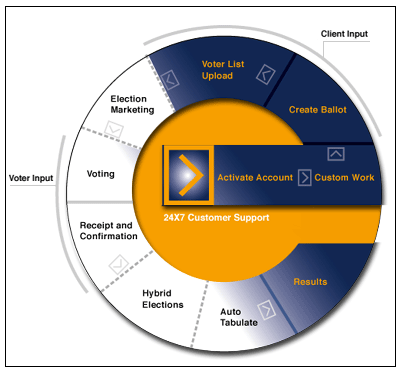
- Activate Account - The eBallot team will setup your election site and integrate it with your web site.
- Custom Work - If you have purchased customizations to your eBallot account, they will be designed and implemented by our team of election experts.
- Create Ballot - Using our online Election Commission, you can login to create your ballot using our copy-and-paste and point-and-click ballot setup tools.
- Voter List Upload - Provide the eBallot team with your eligible voter list in electronic format. Our team will review your list and scrub it so that there are no mistakes.
- Election Marketing - Market your election to your voters using our innovative email reminder system. Clients can also use traditional marketing methods and in-house mailers and postcards to market their elections to voters.
- Voting - Once your election has started, voters can login to view the ballot and cast their vote anytime/anywhere online via a web browser.
- Receipt and Confirmation - After casting a ballot, each voter is presented with a unique confirmation receipt that verifies that their vote is cast accurately.
- Hybrid Elections - For organizations using paper ballots alongside online voting, they can use eBallot's Offline Vote Center to add paper ballot data to eBallot and consolidate the vote tabulation.
- Auto Tabulate - eBallot will automatically tabulate the results and declare winners.
- Results - Each Election Administrator can login to our secure Election Commission to view their organization's results online.

